
 Joy Melissa
As data scientists and analysts we cannot do anything without datasets.
There are many open-source datasets available on sites such as Kaggle, fivethirtyeight, Data.gov and Google public datasets.
We can also create datasets from a broad array of public online sources, capturing ephemeral information on products to extract intelligence.
Another method of downloading data from a website is by using web scraping libraries available in Python such as Selenium, Scrapy and Beautiful Soup.
However, in this article, I will focus on a simple way to scrape data from the web with Python that goes directly to the API endpoint.
In a nutshell, the website will send out a request for the API for the information(when the page is loading), pick it up and render it on the page for you to see.
API takes the request from the website and sends the data it is requesting back to it.
Not all websites use REST API endpoints but there are a considerable number that do.
Let’s take a look at a company that uses analytics to shape the customer journey and is redefining the furniture shopping experience.

Objective: To get all the beds from IKEA together with the product details and import data into excel for analysis.
Step 1: Navigate to the URL you wish to inspect. In this case https://www.ikea.com/us/en/cat/beds-bm003/
Step 2: Open the developer console in your browser.
Here are some shortcuts to call out the console from your browser:
- Chrome: Ctrl + Shift + I
- Microsoft Edge: F12
- Firefox: Ctrl + Shift + K
- As an alternative, you can right-click on the webpage and click “Inspect” to open the developer console.
For demonstration purposes we will use Google Chrome.
Let’s find the API endpoint!
Step 3: Once the console displays:
- Go to the “Network” tab
- Click on “XHR”
- Make sure the “recording” button is enabled
- Reload the page
We should be able to find out where this information is coming from and how we can replicate that request to get the data.

XMLHttpRequest (XHR) is an API in the form of an object whose methods transfer data between a web browser and a web server. The object is provided by the browser’s JavaScript environment. Particularly, retrieval of data from XHR for the purpose of continually modifying a loaded web page is the underlying concept of Ajax design. Despite the name, XHR can be used with protocols other than HTTP and data can be in the form of not only XML,[1] but also JSON,[2] HTML or plain text.[3]
Now, you will have a list of requests in the developer console.
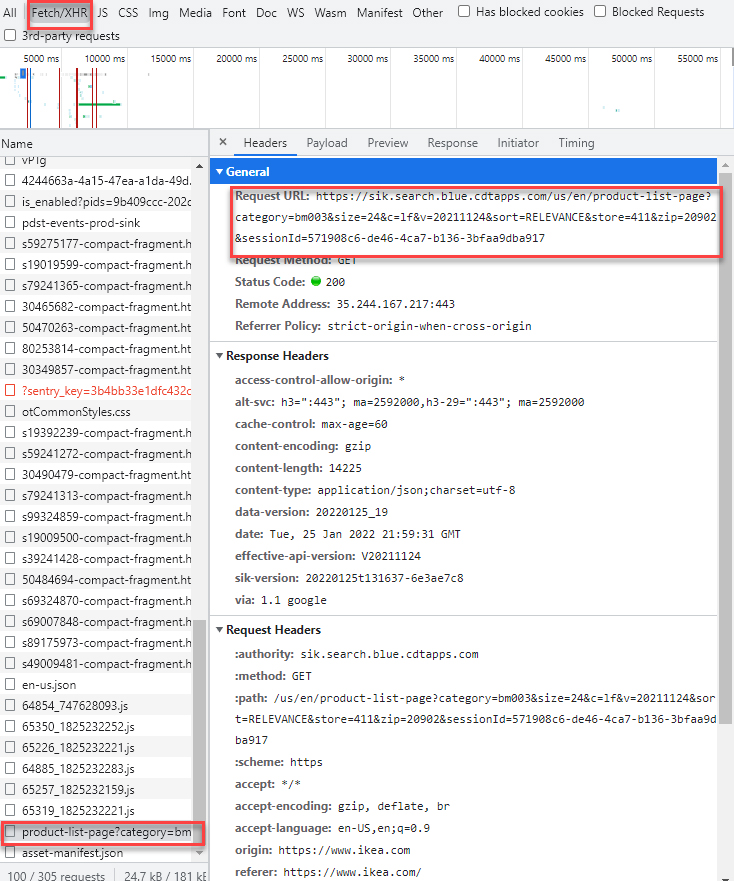
We can see that there is a request to have its name called “product-list-page…”. That’s the one!
Step 4: Go to the “Headers” tab, you will see the detail of this request. The most important thing is the URL.
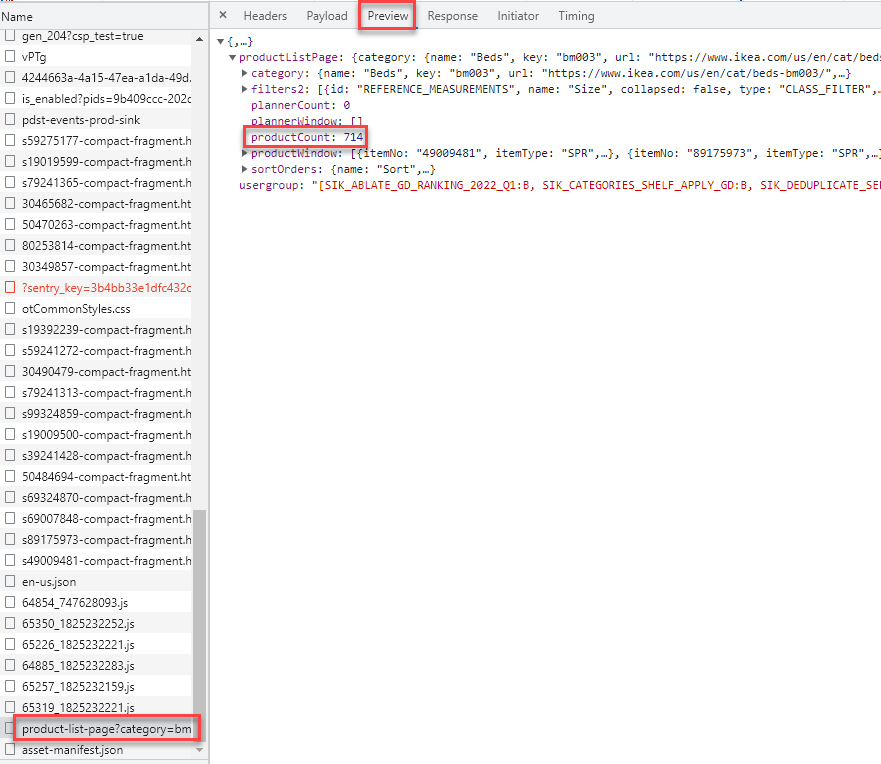
Step 5: Select the “Preview” button, and you will see “product count” is 714, but the “product window” will only give 24 of them.
Checkout the page… only 24 products will be listed on the page, and a “load more” button is provided if you want to keep browsing more.
This is very common in Web Development to save server resources and bandwidth.
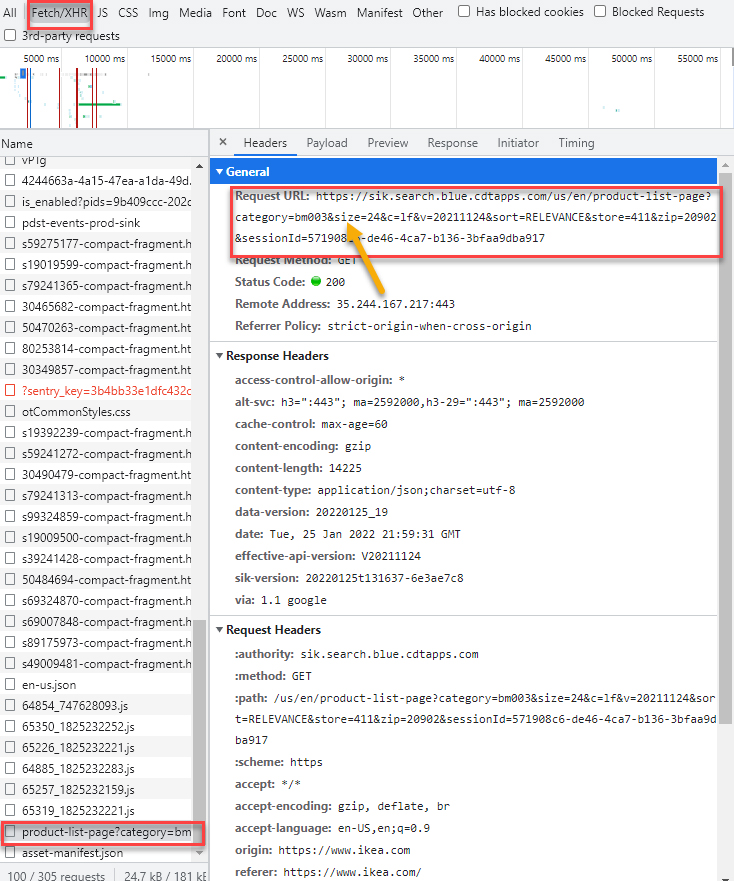
Pay attention to the property called “size”, it equals 24, which is the page size.
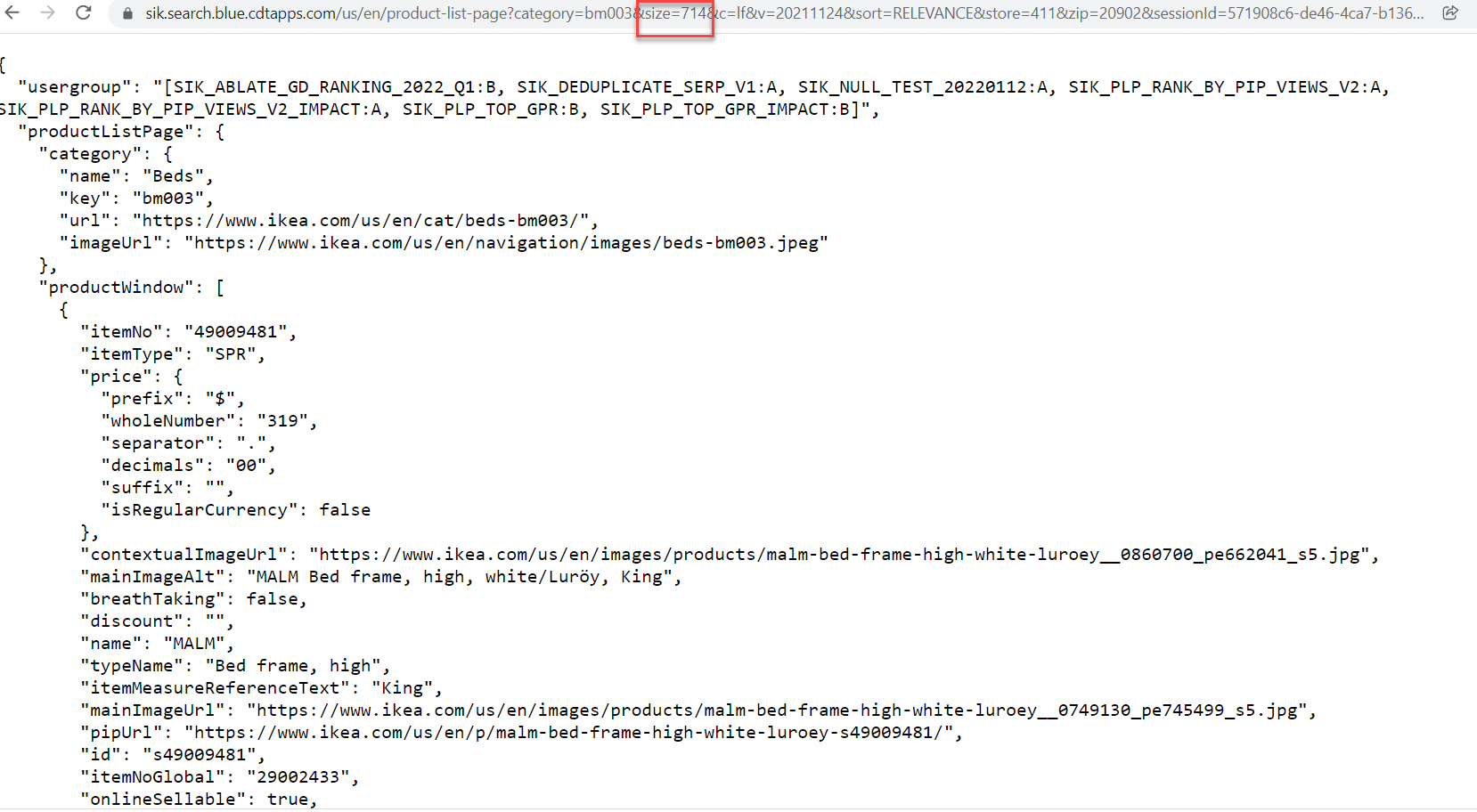
Step 6: In the url change size=714. This will allow you to view all 714 records, instead of just 24.
After we change size=714it will display all 714 records of IKEA beds.
Here we open that URL in another browser tab to see “size” equals 714.
Step 7: Send the request using the Python built-in library requests

Requests is a Python library that will allow you to send HTTP/1.1 requests. With it, you can add content like headers, form data, multipart files, and parameters via simple Python libraries. It also allows you to access the response data of Python in the same way.
In programming, a library is a collection or pre-configured selection of routines, functions, and operations that a program can use. These elements are often referred to as modules, and stored in object format.
Libraries are important, because you load a module and take advantage of everything it offers without explicitly linking to every program that relies on them. They are truly standalone, so you can build your own programs with them and yet they remain separate from other programs.
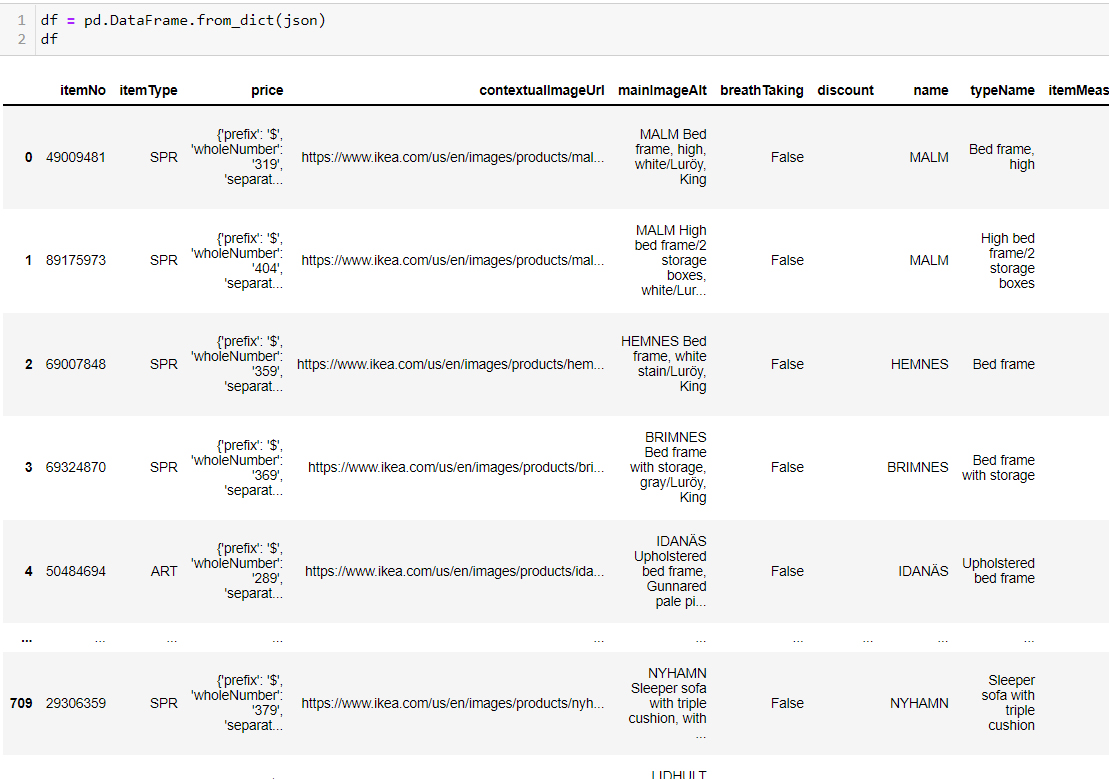
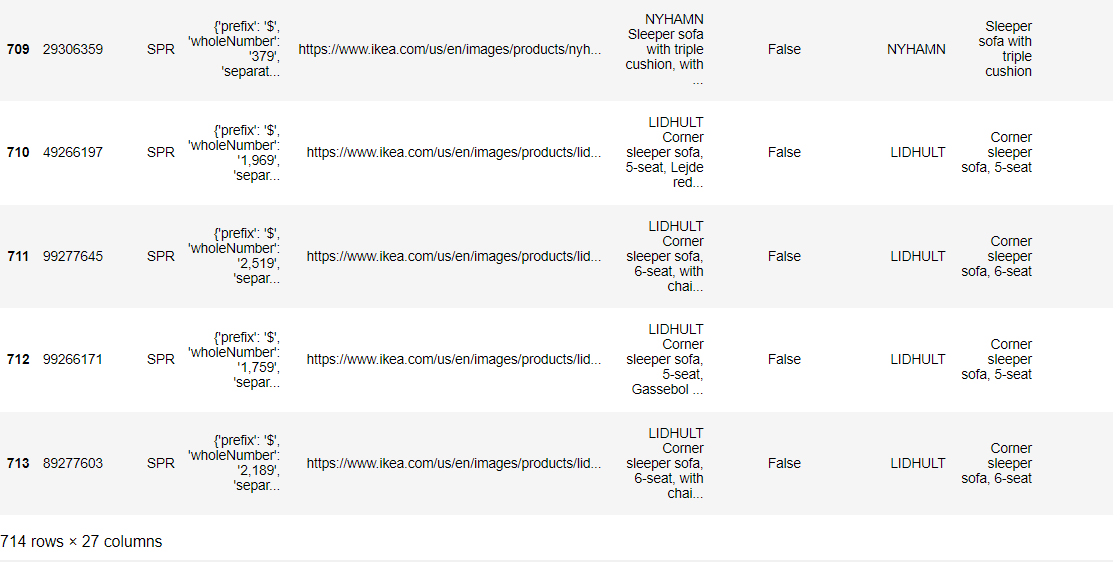
After that, the request will convert the JSON object to a Python dictionary, so we can read it using Pandas now.
In the screenshot below, you can see the first 5 records and the last 5 records
Step 8: You can then take this information and store it in a variable, pull out what you want or create your own dataset.
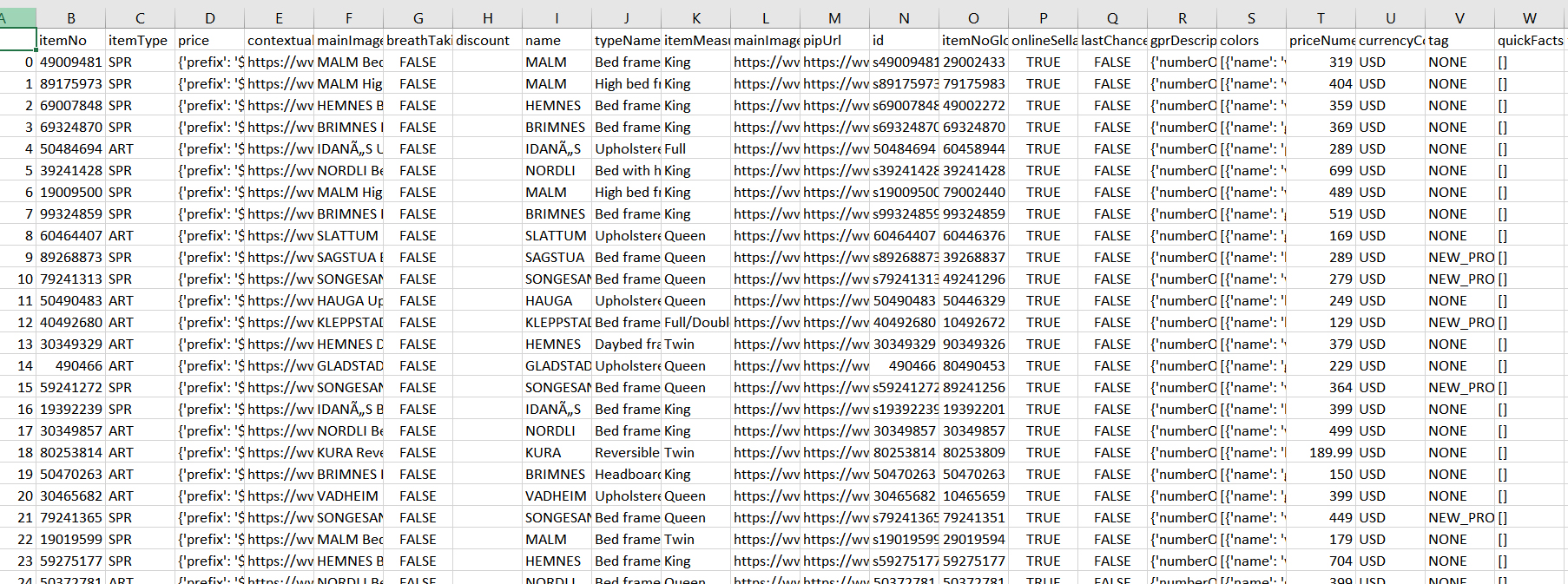
For this purpose we chose to create a dataset:

In our new Excel spreadsheet, we have 714 beds with variables like Item No, Name, Measure, Price, Availability.
Final Notes:
This article was aimed with the purpose of helping you get started with the basics of Web Scraping. We showed you a way to go directly to the API endpoint and get the data back that you’re interested in using one line of code. It’s definitely worth exploring these different methods if you’re scraping data.